Opdaterer


iPhone Screenshots


iPad Screenshots




Beskrivelse
MoneyNote – Simple & Free Budget Tracker
A simple budgeting app to track income and expenses with ease.
No account registration, no bank connections, and no subscriptions.
All data is stored locally for fast, secure, offline use.
Designed with a familiar iOS interface, MoneyNote lets anyone start budgeting instantly.
FEATURES
----------------
• Extremely simple and easy to use
• No account registration required
• Free to use forever (no hidden charges later)
• Built-in calendar for easy tracking
• Budget settings by category
• Monthly, yearly, and cumulative reports
• Unlimited custom categories
• Unlimited fixed income and expense settings
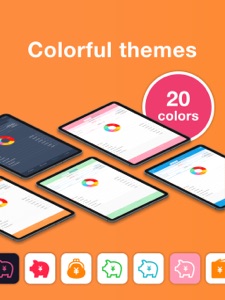
• 20+ theme colours and 20+ app icons
• CSV (Excel) export, PDF export, and printing
• Passcode lock with Face ID and Touch ID
• iCloud backup and iPad sync
• 15+ Home Screen widgets
• Lock Screen widgets supported
Everything you need for daily expense management, completely free.
RECOMMENDED FOR
----------------
• People who don’t want a complicated budgeting app
• Users who feel uneasy linking bank accounts or credit cards
• Those who dislike apps that constantly connect to the internet
• Anyone who wants to record expenses simply and quickly
• Users who gave up on receipt scanning apps
• People who just want easy input
• Anyone who doesn’t want monthly subscription fees
MoneyNote stores all data locally, so it’s fast, secure, and works offline.
Unlike many other apps, there are no monthly subscriptions, and useful features remain free.
FEATURE DETAILS
----------------
[ Input ]
Tap large, easy-to-press category buttons and enter amounts quickly.
The built-in calculator keyboard makes input fast and comfortable.
An automatic input mode allows you to enter multiple receipts continuously.
[ Calendar ]
Check daily income and expenses at a glance on the calendar.
Customise the start day of the week and monthly start or closing dates, making it easy to begin tracking from your payday.
Add or delete entries directly from the calendar for easy bulk input.
Savings and initial balances can be set to display carry-overs and cumulative totals.
[ Reports ]
Monthly income and expenses are displayed in clear pie charts.
View spending ratios by category to easily spot overspending or hidden waste.
[ Backup / CSV / PDF Export ]
All data can be exported as CSV (Excel-compatible) files.
Use exported files as backups and import them when changing devices, including iPhone and iPad.
CSV data can also be used on a computer for accounting or tax filing.
Monthly data can be exported as PDF files for archiving or printing.
[ Theme Colours & App Icons ]
Customise the app with over 20 theme colours, from soft pinks to chic dark blues.
Change the app icon to match your style, choosing from more than 20 designs.
[ Passcode Lock ]
Protect your financial data with a passcode.
Face ID and Touch ID are fully supported.
[ Widgets ]
Supports both Home Screen and Lock Screen widgets.
Check remaining budgets by category without opening the app.
See how much you can still spend this month.
Display a mini calendar showing recorded days.
Add new entries directly from the Lock Screen with a single tap.
ABOUT THE APP
----------------
MoneyNote is a simple and free budgeting app with no subscriptions.
Just record your income and expenses, and the app automatically organises them into clear calendars and reports, helping you understand your finances at a glance.
Unlike overly complex apps that rely on bank syncing or receipt scanning,
MoneyNote focuses on essential features only, designed to be fast, clear, and easy for anyone to use.
Hvad er nyt i denne version? (5.1.1)
- Added a setting that allows the input screen to start from the "Income" screen instead of "Expense."
- Fixed bugs in the budget management feature.
(Issues where settings were not applied or dates were shifted for some users have been resolved.)
- Fixed a bug where the carryover and balance might not be displayed on the report screen.
- Added an option in the budget feature to exclude "expenses from categories without a budget" from the total budget amount.
Example: You can now exclude amounts for categories like "Entertainment" (if no budget is set for it) from the "Total Budget." This allows you to focus only on the categories you have intentionally budgeted for, without worrying about unplanned expenses.
You can enable this from the button at the bottom of the budget settings screen.
Sælger
Navn
Komorebi Inc.
Info
Udvikler
Kategorier
Version
5.1.1
Størrelse
132,6 MB
Game Center
Nej
VPP Device Licensing
Ja
Vurdering
Alder: 4+
Kompatibilitet
iOS 14.0 eller senere
Enheder
iPhone 5s, iPhone 6, iPhone 6 Plus, iPhone 6s, iPhone 6s Plus, iPhone SE, iPhone 7, iPhone 7 Plus, iPhone 8, iPhone 8 Plus, iPhone X, iPhone XR, iPhone XS, iPhone XS Max, iPhone 11, iPhone 11 Pro, iPhone 11 Pro Max, iPhone SE (2. generation), iPhone 12, iPhone 12 Pro, iPhone 12 Pro Max, iPhone 12 mini, iPhone 13, iPhone 13 Pro, iPhone 13 Pro Max, iPhone 13 mini, iPhone SE (3. generation), iPhone 14, iPhone 14 Plus, iPhone 14 Pro, iPhone 14 Pro Max, iPhone 15, iPhone 15 Plus, iPhone 15 Pro, iPhone 15 Pro Max, iPhone 16, iPhone 16 Plus, iPhone 16 Pro, iPhone 16 Pro Max, iPhone 16e, iPhone 17, iPhone 17 Pro, iPhone 17 Pro Max, iPhone Air, iPad (5. generation) Wi-Fi, iPad (5. generation) Wi-Fi + Cellular, iPad (6. generation) Wi-Fi, iPad (6. generation) Wi-Fi + Cellular, iPad Pro, iPad Pro (Cellular), iPad Pro (9,7"), iPad Pro (9,7") (Cellular), iPad Pro 12,9" (2. generation), iPad Pro 12,9" (2. generation) Wi-Fi + Cellular, iPad Pro (10,5"), iPad Pro (10,5") Wi-Fi + Cellular, iPad Pro (11"), iPad Pro (11") Wi-Fi + Cellular, iPad Pro 12,9" (3. generation), iPad Pro 12,9" (3. generation) Wi-Fi + Cellular, iPad Air, iPad Air (Cellular), iPad Air 2, iPad Air 2 (Cellular), iPad Air (3. generation), iPad Air (3. generation) Wi-Fi + Cellular, iPad mini Retina, iPad mini Retina (Cellular), iPad mini 3, iPad mini 3 (Cellular), iPad mini 4, iPad mini 4 (Cellular), iPad mini (5. generation), iPad mini (5. generation) Wi-Fi + Cellular, iPad (7. generation) Wi-Fi + Cellular, iPad Pro 11" (2. generation), iPad Pro 11" (2. generation) Wi-Fi + Cellular, iPad Pro 12,9" (4. generation), iPad Pro 12,9" (4. generation) Wi-Fi + Cellular, iPad Air (4. generation) (Wi-Fi), iPad Air (4. generation) (Wi-Fi + Cellular), iPad (8. generation) Wi-Fi, iPad (8. generation) Wi-Fi + Cellular, iPad Pro 11" (3. generation), iPad Pro 11" (3. generation) Wi-Fi + Cellular, iPad Pro 12,9" (5. generation), iPad Pro 12,9" (5. generation) Wi-Fi + Cellular, iPad (9. generation), iPad (9. generation) Wi-Fi + Cellular, iPad mini (6. generation), iPad mini (6. generation) Wi-Fi + Cellular, iPad Air (5. generation), iPad Air (5. generation) Wi-Fi + Cellular, iPad Pro 11" (4. generation), iPad Pro 11" (4. generation) Wi-Fi + Cellular, 12,9" iPad Pro (6. generation), 12,9" iPad Pro (6. generation) Wi-Fi + Cellular, iPad (10. generation), iPad (10. generation) Wi-Fi + Cellular, iPad Air 11" (M2) Wi-Fi, iPad Air 13" (M2) Wi-Fi, iPad Air 13" (M2) Wi-Fi + Cellular, iPad Pro 11" (M4) Wi-Fi, iPad Pro 11" (M4) Wi-Fi + Cellular, iPad Pro 13" (M4) Wi-Fi, iPad Pro 13" (M4) Wi-Fi + Cellular, iPad mini (A17 Pro) Wi-Fi, iPad mini (A17 Pro) Wi-Fi + Cellular, iPad (A16) Wi-Fi, iPad (A16) Wi-Fi + Cellular, iPad Air 11" (M3) Wi-Fi, iPad Air 11" (M3) Wi-Fi + Cellular, iPad Air 13" (M3) Wi-Fi, iPad Air 13" (M3) Wi-Fi + Cellular, iPad Pro 11" (M5) Wi-Fi, iPad Pro 11" (M5) Wi-Fi + Cellular, iPad Pro 13" (M5) Wi-Fi, iPad Pro 13" (M5) Wi-Fi + Cellular, iPod touch (6. generation), iPod touch (7. generation)
Sprog
dansk, bulgarsk, catalansk, engelsk, finsk, fransk, græsk, hindi, hollandsk, indonesisk, italiensk, japansk, kinesisk, koreansk, kroatisk, malay, norsk bokmål, polsk, portugisisk, rumænsk, russisk, serbisk, slovakisk, spansk, svensk, thailandsk, tjekkisk, tyrkisk, tysk, ukrainsk, ungarsk, vietnamesisk
App Store: Vurderinger
Anmeldelser og vurderinger
5,0 af 5 (2 bedømmelser)
App Store: Anmeldelser
Intet element