Opdaterer


iPhone Screenshots






iPad Screenshots




Beskrivelse
LOOP: Learn a new guitar lick to a song, watching your favorite musician. Practice makes perfection where you can loop the song to play with the musician.
ZOOM: He shoots, he scores but the referee calls goalie interference. Zoom in, review the play and be the judge. Was the ref right or the fan? Pinch to zoom in and move the video around the screen to inspect the scene.
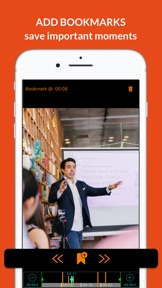
BOOKMARK: Watching an educational video with no time to take notes? With Super Looper, you can add bookmarks and save the most important content. When using headphones press pause on remote to add the bookmark.
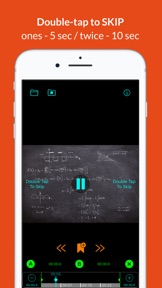
SEEK: Skip the boring scenes in the video and cut to the chase. Double-tap to skip from 5 seconds to 5 minutes! The more you tap, the longer you skip.
AB REPEAT: The movie is too long? Loop the most interesting part - select start & endpoints with A and B buttons. Cancel loop with X
EXPORT: Save your loop as a video file (MOV)
GIF: Export your loop as an animated GIF!
Super Looper is an awesome tool for home learning! Play language courses, video tutorials or cooking classes and master your skills. Use it for sport's analysis looping a short part of the video and zooming on athlete movements. Zoom and AB Repeat your favorite music videos from and learn popular dance choreography. Practice with the best and learn by repetition with Looper Video Player!
By default, the AB Loop is set at the start & end of the video. You can change it with markers on the timeline or AB Repeat panel. Select start & endpoints with A and B buttons and cancel with X.
Please note: It's not always possible to play a loop exactly from the selected start point, it depends on the video codecs.
Loop Button turns on / off the repetitions. Select the number of reps in settings.
For long videos use ( + ) button to enlarge the video timeline.
Double Tap right to Fast Forward or left to Rewind. With every double-click skip time increases, up to 5 minutes.
When watching the movie pinch the screen to zoom the view. You can drag the video around the screen to inspect interesting parts. Close-up on your favorite actor, dance moves or other curious details. Pinch the screen again to reset zoom.
To export the loop press the "Info" and "Export" button and select your export format. The video control knob has to be „inside“ the loop. For very short loops pause the video before exporting.
---------
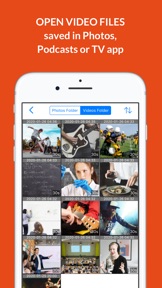
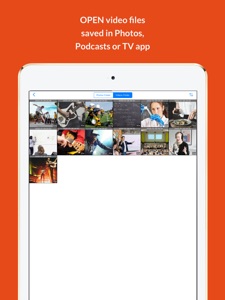
Watch videos from your apps folders (Photos, Podcasts, and TV). Keep your search history to access content easily.
When watching local movies you can adjust the playback speed.
Access your local videos from the application on the fly. No need to fiddle around with accessing content. Simple with loop, zoom, and swipe at your fingertips.
If you have any ideas about this app, please let me know @ boramaapps@gmail.com
Terms of services: https://www.apple.com/legal/internet-services/itunes/dev/stdeula/
Hvad er nyt i denne version? (1.54)
Improvements!
Info
Udvikler
Kategorier
Version
1.54
Størrelse
13,8 MB
Game Center
Nej
VPP Device Licensing
Ja
Vurdering
Rated 17+ for the following:
Unrestricted Web Access
Kompatibilitet
iOS 14.0 eller senere
Enheder
iPhone 5s, iPhone 6, iPhone 6 Plus, iPhone 6s, iPhone 6s Plus, iPhone SE, iPhone 7, iPhone 7 Plus, iPhone 8, iPhone 8 Plus, iPhone X, iPhone XR, iPhone XS, iPhone XS Max, iPhone 11, iPhone 11 Pro, iPhone 11 Pro Max, iPhone SE (2. generation), iPhone 12, iPhone 12 Pro, iPhone 12 Pro Max, iPhone 12 mini, iPhone 13, iPhone 13 Pro, iPhone 13 Pro Max, iPhone 13 mini, iPhone SE (3. generation), iPhone 14, iPhone 14 Plus, iPhone 14 Pro, iPhone 14 Pro Max, iPhone 15, iPhone 15 Plus, iPhone 15 Pro, iPhone 15 Pro Max, iPhone 16, iPhone 16 Plus, iPhone 16 Pro, iPhone 16 Pro Max, iPhone 16e, iPhone 17, iPhone 17Pro, iPhone 17ProMax, iPhone Air, iPad (5. generation) Wi-Fi, iPad (5. generation) Wi-Fi + Cellular, iPad (6. generation) Wi-Fi, iPad (6. generation) Wi-Fi + Cellular, iPad Pro, iPad Pro (Cellular), iPad Pro (9,7"), iPad Pro (9,7") (Cellular), iPad Pro 12,9" (2. generation), iPad Pro 12,9" (2. generation) Wi-Fi + Cellular, iPad Pro (10,5"), iPad Pro (10,5") Wi-Fi + Cellular, iPad Pro (11"), iPad Pro (11") Wi-Fi + Cellular, iPad Pro 12,9" (3. generation), iPad Pro 12,9" (3. generation) Wi-Fi + Cellular, iPad Air, iPad Air (Cellular), iPad Air 2, iPad Air 2 (Cellular), iPad Air (3. generation), iPad Air (3. generation) Wi-Fi + Cellular, iPad mini Retina, iPad mini Retina (Cellular), iPad mini 3, iPad mini 3 (Cellular), iPad mini 4, iPad mini 4 (Cellular), iPad mini (5. generation), iPad mini (5. generation) Wi-Fi + Cellular, iPad (7. generation) Wi-Fi + Cellular, iPad Pro 11" (2. generation), iPad Pro 11" (2. generation) Wi-Fi + Cellular, iPad Pro 12,9" (4. generation), iPad Pro 12,9" (4. generation) Wi-Fi + Cellular, iPad Air (4. generation) (Wi-Fi), iPad Air (4. generation) (Wi-Fi + Cellular), iPad (8. generation) Wi-Fi, iPad (8. generation) Wi-Fi + Cellular, iPad Pro 11" (3. generation), iPad Pro 11" (3. generation) Wi-Fi + Cellular, iPad Pro 12,9" (5. generation), iPad Pro 12,9" (5. generation) Wi-Fi + Cellular, iPad (9. generation), iPad (9. generation) Wi-Fi + Cellular, iPad mini (6. generation), iPad mini (6. generation) Wi-Fi + Cellular, iPad Air (5. generation), iPad Air (5. generation) Wi-Fi + Cellular, iPad Pro 11" (4. generation), iPad Pro 11" (4. generation) Wi-Fi + Cellular, 12,9" iPad Pro (6. generation), 12,9" iPad Pro (6. generation) Wi-Fi + Cellular, iPad (10. generation), iPad (10. generation) Wi-Fi + Cellular, iPad Air 11" (M2) Wi-Fi, iPad Air 13" (M2) Wi-Fi, iPad Air 13" (M2) Wi-Fi + Cellular, iPad Pro 11" (M4) Wi-Fi, iPad Pro 11" (M4) Wi-Fi + Cellular, iPad Pro 13" (M4) Wi-Fi, iPad Pro 13" (M4) Wi-Fi + Cellular, iPad mini (A17 Pro) Wi-Fi, iPad mini (A17 Pro) Wi-Fi + Cellular, iPad (A16) Wi-Fi, iPad (A16) Wi-Fi + Cellular, iPad Air 11" (M3) Wi-Fi, iPad Air 11" (M3) Wi-Fi + Cellular, iPad Air 13" (M3) Wi-Fi, iPad Air 13" (M3) Wi-Fi + Cellular, iPad Pro11M5, iPad Pro11M5Cellular, iPad Pro13M5, iPad Pro13M5Cellular, iPod touch (6. generation), iPod touch (7. generation)
Sprog
engelsk
App Store: Vurderinger
Anmeldelser og vurderinger
0,0 af 5 (Ingen bedømmelse)
App Store: Anmeldelser
Intet element