Opdaterer


±0
#77 i Top Paid iPad Apps > Mad og drikke
iPhone Screenshots





iPad Screenshots



Beskrivelse
Personal Wine Cellar Database
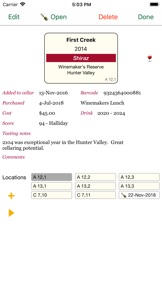
WineCellar is designed to allow users to manage their cellars and keep track of their wines in a simple tabular view of the world. It is ideal for the person who is currently using a spreadsheet to track their wine.
The app works on iPhone, iPad and MacOS devices. You can use iCloud to keep your devices in synch. You will then have an up to date copy in your pocket on those buying trips to the cellar door or wine store.
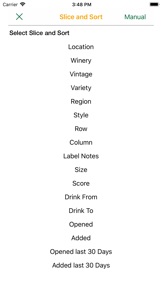
The app is optimised for entering data quickly and, importantly, for sorting and searching for wines under any criteria. Barcodes can be scanned to add or find bottles in your own cellar.
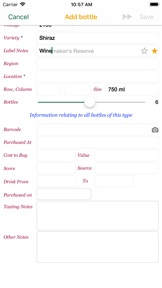
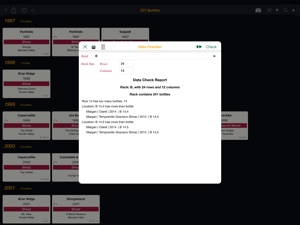
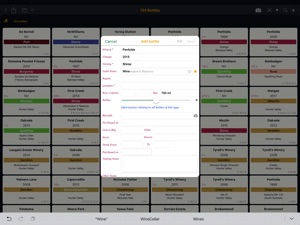
Flexible functions allow you to add individual bottles, add multiple bottles of the same wine in a single action, move bottles, open bottles, set up your racks or locations to match your physical storage/s, search by many options, sort a search result to suit and do data checks to review the integrity of your cellar.
Data can be imported from CSV files for those currently using spreadsheets to track their wines.
Features
- Extensive search and sort functions
- Shortcuts to add extra bottles
- Shortcuts to move bottles
- Record bottles opened, with notes
- Data Checking reports
- Print reports of the bottles
- Create backup CSV files in email or on iCloud
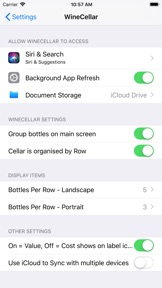
- Use iCloud to synchronise between multiple devices and users.
- Scan Barcode to add / find bottles in your own cellar.
- Visual auditing tool, with drag and drop capability to move bottles
- Customisable colours for bottle icons
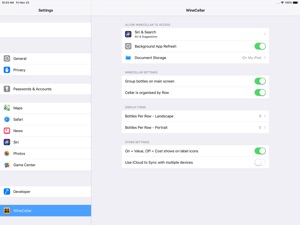
- Settings to customise number (size) of icons displayed on screen.
- Included PDF user manual to fully describe all features.
- supports Dark mode
- supports larger text sizes.
Hvad er nyt i denne version? (3.3)
Bug fixes around synchronising between devices when using the bulk variety name change.
Sælger
Navn
Graham Rawlins
Info
Udvikler
Kategorier
Version
3.3
Størrelse
22,9 MB
Game Center
Nej
VPP Device Licensing
Ja
Vurdering
Rated 17+ for the following:
Frequent/Intense Alcohol, Tobacco, or Drug Use or References
Kompatibilitet
iOS 15.6 eller senere
Enheder
iPhone 5s, iPhone 6, iPhone 6 Plus, iPhone 6s, iPhone 6s Plus, iPhone SE, iPhone 7, iPhone 7 Plus, iPhone 8, iPhone 8 Plus, iPhone X, iPhone XR, iPhone XS, iPhone XS Max, iPhone 11, iPhone 11 Pro, iPhone 11 Pro Max, iPhone SE (2. generation), iPhone 12, iPhone 12 Pro, iPhone 12 Pro Max, iPhone 12 mini, iPhone 13, iPhone 13 Pro, iPhone 13 Pro Max, iPhone 13 mini, iPhone SE (3. generation), iPhone 14, iPhone 14 Plus, iPhone 14 Pro, iPhone 14 Pro Max, iPhone 15, iPhone 15 Plus, iPhone 15 Pro, iPhone 15 Pro Max, iPhone 16, iPhone 16Plus, iPhone 16Pro, iPhone 16ProMax, iPad (5. generation) Wi-Fi, iPad (5. generation) Wi-Fi + Cellular, iPad (6. generation) Wi-Fi, iPad (6. generation) Wi-Fi + Cellular, iPad Pro, iPad Pro (Cellular), iPad Pro (9,7"), iPad Pro (9,7") (Cellular), iPad Pro 12,9" (2. generation), iPad Pro 12,9" (2. generation) Wi-Fi + Cellular, iPad Pro (10,5"), iPad Pro (10,5") Wi-Fi + Cellular, iPad Pro (11"), iPad Pro (11") Wi-Fi + Cellular, iPad Pro 12,9" (3. generation), iPad Pro 12,9" (3. generation) Wi-Fi + Cellular, iPad Air, iPad Air (Cellular), iPad Air 2, iPad Air 2 (Cellular), iPad Air (3. generation), iPad Air (3. generation) Wi-Fi + Cellular, iPad mini Retina, iPad mini Retina (Cellular), iPad mini 3, iPad mini 3 (Cellular), iPad mini 4, iPad mini 4 (Cellular), iPad mini (5. generation), iPad mini (5. generation) Wi-Fi + Cellular, iPad (7. generation) Wi-Fi + Cellular, iPad Pro 11" (2. generation), iPad Pro 11" (2. generation) Wi-Fi + Cellular, iPad Pro 12,9" (4. generation), iPad Pro 12,9" (4. generation) Wi-Fi + Cellular, iPad Air (4. generation) (Wi-Fi), iPad Air (4. generation) (Wi-Fi + Cellular), iPad (8. generation) Wi-Fi, iPad (8. generation) Wi-Fi + Cellular, iPad Pro 11" (3. generation), iPad Pro 11" (3. generation) Wi-Fi + Cellular, iPad Pro 12,9" (5. generation), iPad Pro 12,9" (5. generation) Wi-Fi + Cellular, iPad (9. generation), iPad (9. generation) Wi-Fi + Cellular, iPad mini (6. generation), iPad mini (6. generation) Wi-Fi + Cellular, iPad Air (5. generation), iPad Air (5. generation) Wi-Fi + Cellular, iPad Pro 11" (4. generation), iPad Pro 11" (4. generation) Wi-Fi + Cellular, 12,9" iPad Pro (6. generation), 12,9" iPad Pro (6. generation) Wi-Fi + Cellular, iPad (10. generation), iPad (10. generation) Wi-Fi + Cellular, iPad Air 11" (M2) Wi-Fi, iPad Air 13" (M2) Wi-Fi, iPad Air 13" (M2) Wi-Fi + Cellular, iPad Pro 11" (M4) Wi-Fi, iPad Pro 11" (M4) Wi-Fi + Cellular, iPad Pro 13" (M4) Wi-Fi, iPad Pro 13" (M4) Wi-Fi + Cellular, iPad MiniA17Pro, iPad MiniA17ProCellular, iPod touch (6. generation), iPod touch (7. generation), Mac Desktop
Sprog
engelsk
App Store: Vurderinger
Anmeldelser og vurderinger
0,0 af 5 (Ingen bedømmelse)
App Store: Anmeldelser
Intet element