OmVilkårPrivathedKontakt
 
Opdaterer
Ear Trainer

Ear Trainer

Udgivet: 2010-05-25
© thoor software AB
Ear Trainer - QR Code
Version 4.3
4+
Hent i App Store
Version 4.3
4+
Hent i App Store
Udgivet: 2010-05-25
© thoor software AB

iPhone Screenshots

Skærmbillede
Skærmbillede
Skærmbillede
Skærmbillede
Skærmbillede

iPad Screenshots

Skærmbillede
Skærmbillede
Skærmbillede
Skærmbillede
Skærmbillede

Beskrivelse

With an overall 4.8 out of 5 rating in it is a must to try out this ear training app.
What our users says:
Awesome ear training app *****
One of the most in depth apps out there for ear training and a easy to use interface. You can even make your own exercises. I wish you could undo a note entry in the melodic exercises, a lot of the times iv just pressed the wrong note because of my fat fingers but I guess it’s part of the challenge to not make a mistake(wish you could change it in the settings or something). Still a must buy for ear training.
Guy *****
You guys deserve 1000000 stars thank you
Everything You Need ****
It took a while for me to appreciate this app. It wasn't until I had a bit of ear training done that I could see the limitations in other apps and how this one would take me further and teach more of what I could actually use versus simpler apps. Once I could hear intervals up to an octave and major vs minor chords, this app had plenty more for me to study. Great app.
----
Listening is the most important skill in music, and this app will help you to listen better.
Ear Trainer is an educational tool designed for musicians, music students and anyone interested in improving ones musical ear. It has over 260 individual exercises that are conveniently placed into nine different areas of study. It is also possible to create custom exercises so that you can practice exactly what you need.
No need to be an expert, Ear Trainer is suitable for all users from beginner to very advanced. No matter what level your musical hearing skills are, Ear Trainer will help to hone them.
* Built-in Exercises *
- Interval Comparison (48 different exercises)
- Interval Identification (30 different exercises)
- Chord Identification (48 different exercises)
- Chord Inversions (24 different exercises)
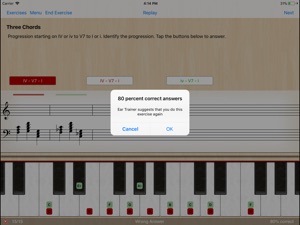
- Chord Progressions (25 different exercises)
- Scales (24 different exercises)
- Note relative to chord (18 different exercises)
- Relative Pitch (12 different exercises)
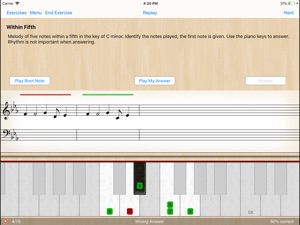
- Melody Exercises (38 different exercises)
Each exercise has a short description of its purpose and optional preview. A virtual piano keyboard and note view in each exercise helps you visually understand and analyze the notes that have been played. To aid your progression you can compare the different options after answering. (You can even play the virtual piano if you like!)
As you work through the exercises, statistics are collected so that you can see your progress.
The questions in the exercises are randomly generated so you can do them over and over again as many times as you like to continue to hone your skills.
* Custom Exercises *
Users can create their own custom exercises to match their desired areas of study and/or skill level. The following areas are available for custom exercises:
- Interval Comparison
- Interval Identification
- Chord Identification
- Chord inversion
- Chord Progression
- Scale Identification
- Note after chord
* Share Custom Exercises *
Custom exercises can be shared with friends and class mates through Email, AirDrop and iMessage.
What our users says:
------
***** Must Have!!!
This is the best Ear Trainer of all I tried in App Store, everything works just perfectly. If you are interested in improving your musical hearing you must have it.
------
***** Amazing
I have been using this app every day for just about a year now and the result are simply amazing.
------
**** I'm in my second third semester as a music major and I have to say, this is a great app for any music major, or anyone looking for ear training. I like that I'm able to switch between different instruments, it makes hearing the notes on the instrument you're use to a bit easier for me.
------
For more information please see: www.dev4phone.com

Hvad er nyt i denne version? (4.3)

- Added support for MIDI out to use a digital piano for playback

Sælger

Navn

thoor software AB

Adresse

Info

Kategorier

Version

4.3

Størrelse

94,1 MB

Game Center

Nej

VPP Device Licensing

Ja

Vurdering

Alder: 4+

Kompatibilitet

iOS 12.1 eller senere

Enheder

iPhone 5s, iPhone 6, iPhone 6 Plus, iPhone 6s, iPhone 6s Plus, iPhone SE, iPhone 7, iPhone 7 Plus, iPhone 8, iPhone 8 Plus, iPhone X, iPhone XR, iPhone XS, iPhone XS Max, iPhone 11, iPhone 11 Pro, iPhone 11 Pro Max, iPhone SE (2. generation), iPhone 12, iPhone 12 Pro, iPhone 12 Pro Max, iPhone 12 mini, iPhone 13, iPhone 13 Pro, iPhone 13 Pro Max, iPhone 13 mini, iPad (5. generation) Wi-Fi, iPad (5. generation) Wi-Fi + Cellular, iPad (6. generation) Wi-Fi, iPad (6. generation) Wi-Fi + Cellular, iPad Pro, iPad Pro (Cellular), iPad Pro (9,7"), iPad Pro (9,7") (Cellular), iPad Pro 12,9" (2. generation), iPad Pro 12,9" (2. generation) Wi-Fi + Cellular, iPad Pro (10,5"), iPad Pro (10,5") Wi-Fi + Cellular, iPad Pro (11"), iPad Pro (11") Wi-Fi + Cellular, iPad Pro 12,9" (3. generation), iPad Pro 12,9" (3. generation) Wi-Fi + Cellular, iPad Air, iPad Air (Cellular), iPad Air 2, iPad Air 2 (Cellular), iPad Air (3. generation), iPad Air (3. generation) Wi-Fi + Cellular, iPad mini Retina, iPad mini Retina (Cellular), iPad mini 3, iPad mini 3 (Cellular), iPad mini 4, iPad mini 4 (Cellular), iPad mini (5. generation), iPad mini (5. generation) Wi-Fi + Cellular, iPad (7. generation) Wi-Fi + Cellular, iPad Pro 11" (2. generation), iPad Pro 11" (2. generation) Wi-Fi + Cellular, iPad Pro 12,9" (4. generation), iPad Pro 12,9" (4. generation) Wi-Fi + Cellular, iPad Air (4. generation) (Wi-Fi), iPad Air (4. generation) (Wi-Fi + Cellular), iPad (8. generation) Wi-Fi, iPad (8. generation) Wi-Fi + Cellular, iPad Pro 11" (3. generation), iPad Pro 11" (3. generation) Wi-Fi + Cellular, iPad Pro 12,9" (5. generation), iPad Pro 12,9" (5. generation) Wi-Fi + Cellular, iPad (9. generation), iPad (9. generation) Wi-Fi + Cellular, iPad mini (6. generation), iPad mini (6. generation) Wi-Fi + Cellular, iPod touch (6. generation), iPod touch (7. generation)

Sprog

engelsk

App Store: Vurderinger

Anmeldelser og vurderinger

4,0 af 5 (15 bedømmelser)

App Store: Anmeldelser

2019-06-15

It’s worth the money but...

There are a lot of issues that would be easy to fix which severely hinders the usefulness of the app
- the piano sound is so bad that it actively hinders learning. It makes the app unpleasant to use at times
- the randomization mechanism has not been given any thought at all, it’s a naive implementation that’ll constantly give you the same chord in a row, or give you the same interval ad nauseam.
When the exercise is identifying fourth tritone and fifth intervals, giving me ten tritones in a row is both frustrating as an experience and pointless as a learning exercise!
- the grouping of the exercises doesn’t make any sense for learning purposes. If you do them in the order provided (which there’s no indication that you shouldn’t!) you’ll run into exercises late in the progression that are so easy that it feels almost insulting.
Skipping around is highly recommended! Not only so you avoid getting bored later on, but also for being challenged appropriately in the beginning
- there’s no information on how to improve when you’re stuck
If I didn’t know about the concept of tying intervals to the beginning notes of songs I wouldn’t be getting anywhere
It would be awesome if, when the app notices you’ve failed the exercise several times, it’ll suggest riffs or songs for memorizing the intervals, or just something!
If you’ve got the discipline and motivation to work through the faults, it’s still a pretty great app
John don John
Version 4.1.3
2013-01-23

Ok - but serious balance issues

It is an ok program, but the balance of the chord tones in e.g. the "Inventions" section where you have to tell which invention you hear, let's say for instance a dominanth seventh chord, is really really bad. Ofte one note is really loud and two are almost not perceptible.
That is a shame, because the concept is good. Also, since it is easy today to fine tune notes in a sequenser to me it would be obvious to use just intonation for the chords to avoid all the beating - the only reason it is done with piano sounds is probably because traditional eartraining typically is done that way...
ConductorComposer
Version 2.0