OmVilkårPrivathedKontakt
 
Opdaterer
Week Timer

Week Timer

Udgivet: 2010-11-10
© 2021 DM Design
Week Timer - QR Code
Version 3.7.1
4+
Hent i App Store
Version 3.7.1
4+
Hent i App Store
Udgivet: 2010-11-10
© 2021 DM Design

iPhone Screenshots

Skærmbillede
Skærmbillede
Skærmbillede
Skærmbillede
Skærmbillede

Beskrivelse

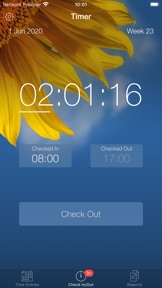
Check In, Check Out, Select & Send...
- It’s that simple.
+ + + + Macworld.se
"Convenient help for reporting your time"
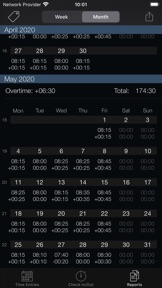
Simply check in when you arrive, check out when you leave and track your work time totals on a daily basis. At the end of the week or month select one or more reports and email them to your work so you can update your timesheet in an efficient manner using either the text (HTML) or spreadsheet (CSV) format.
Features: (followed by some Tips below!)
▸ Streamlined design to efficiently track your time
▸ Day and week hours overview at a glance
▸ Easy export by email both in text (HTML) and spreadsheet (CSV) format
▸ Tags to easily categorize hours in reports
▸ Lunchtime “set and forget”
▸ Decimal or minute notation in reports so you don't need to convert durations yourself e.g. 08.75 vs 08:45
▸ Week number support (European & US)*
▸ Timer runs in background
▸ Icon badge on home screen
▸ Overtime tracking on daily, weekly and monthly basis
▸ Predicted check out time
▸ Irregular daily target hours supported
▸ First day of week automatically set based on location, but can be customized
▸ Tap timer to toggle between overtime, time today, and time since last check in
▸ Quickedit for smooth adjustments of your latest check in, just slide up or down
▸ Tag Quick-Switching: switch a tag in 2 simple taps!
▸ Notes so no details are forgotten
▸ Check out reminders, so you don’t forget to go home...
▸ Backup and restore to easily transfer your data to a new device
▸ Photo themes to personalize your app in a beautiful way
* Week numbers can be disabled in settings if desired
Tips!
• Archive any tags that you no longer need to shorten your tag list
• Tap the title bar of the timer to pre-select or quick switch a tag.
• Slide your finger to the right on a break or time entry to delete it
• Sort your Tags in your preferred order for quick access using the custom button in the tag list view
• Did you know you can select more than one week at a time and send it by email?
• Customize your screen with your own photo!
Check out the website for some more details and screenshots!
http://www.dmdesign.se

Hvad er nyt i denne version? (3.7.1)

- Backup and reset functionality to start with a clean slate when needed
- Support for the latest iOS version
- Bug fixes

Sælger

Navn

DM Design

Info

Udvikler

Kategorier

Version

3.7.1

Størrelse

67,6 MB

Game Center

Nej

VPP Device Licensing

Ja

Vurdering

Alder: 4+

Kompatibilitet

iOS 12.4 eller senere

Enheder

iPhone 5s, iPhone 6, iPhone 6 Plus, iPhone 6s, iPhone 6s Plus, iPhone SE, iPhone 7, iPhone 7 Plus, iPhone 8, iPhone 8 Plus, iPhone X, iPhone XR, iPhone XS, iPhone XS Max, iPhone 11, iPhone 11 Pro, iPhone 11 Pro Max, iPhone SE (2. generation), iPhone 12, iPhone 12 Pro, iPhone 12 Pro Max, iPhone 12 mini, iPad (5. generation) Wi-Fi, iPad (5. generation) Wi-Fi + Cellular, iPad (6. generation) Wi-Fi, iPad (6. generation) Wi-Fi + Cellular, iPad Pro, iPad Pro (Cellular), iPad Pro (9,7"), iPad Pro (9,7") (Cellular), iPad Pro 12,9" (2. generation), iPad Pro 12,9" (2. generation) Wi-Fi + Cellular, iPad Pro (10,5"), iPad Pro (10,5") Wi-Fi + Cellular, iPad Pro (11"), iPad Pro (11") Wi-Fi + Cellular, iPad Pro 12,9" (3. generation), iPad Pro 12,9" (3. generation) Wi-Fi + Cellular, iPad Air, iPad Air (Cellular), iPad Air 2, iPad Air 2 (Cellular), iPad Air (3. generation), iPad Air (3. generation) Wi-Fi + Cellular, iPad mini Retina, iPad mini Retina (Cellular), iPad mini 3, iPad mini 3 (Cellular), iPad mini 4, iPad mini 4 (Cellular), iPad mini (5. generation), iPad mini (5. generation) Wi-Fi + Cellular, iPad (7. generation) Wi-Fi + Cellular, iPad Pro 11" (2. generation), iPad Pro 11" (2. generation) Wi-Fi + Cellular, iPad Pro 12,9" (4. generation), iPad Pro 12,9" (4. generation) Wi-Fi + Cellular, iPad Air (4. generation) (Wi-Fi), iPad Air (4. generation) (Wi-Fi + Cellular), iPad (8. generation) Wi-Fi, iPad (8. generation) Wi-Fi + Cellular, iPad Pro 11" (3. generation), iPad Pro 11" (3. generation) Wi-Fi + Cellular, iPad Pro 12,9" (5. generation), iPad Pro 12,9" (5. generation) Wi-Fi + Cellular, iPod touch (6. generation), iPod touch (7. generation)

Sprog

engelsk, fransk, hollandsk, italiensk, spansk, svensk, tysk

App Store: Vurderinger

Anmeldelser og vurderinger

4,0 af 5 (2 bedømmelser)

App Store: Anmeldelser

2016-02-23

Fantastisk app

Lækker app som er nem og overskuelig. Får sidste stjerne når den kan bruges med Apple watch
Engmark
Version 3.3.1
2012-06-27

Udmærket

Rigtig fint program hvis man gerne vil holde styr på ens ugentlige arbejdstid. Tip: Hvis ugerapporten ikke passer efter man har pillet i opsætningen, så genstart lige applikationen. 5 stjerner når/hvis det bliver nemmere at indsætte pauser i manuelt indtastede tider.
mictand
Version 2.0