OmVilkårPrivathedKontakt
 
Opdaterer
PrintCentral Pro for iPhone

PrintCentral Pro for iPhone

Udgivet: 2011-04-14
© 2008-2021, EuroSmartz Ltd
PrintCentral Pro for iPhone - QR Code
Version 5.6.6
4+
Hent i App Store
Version 5.6.6
4+
Hent i App Store
Udgivet: 2011-04-14
© 2008-2021, EuroSmartz Ltd

iPhone Screenshots

Skærmbillede
Skærmbillede
Skærmbillede
Skærmbillede
Skærmbillede

Beskrivelse

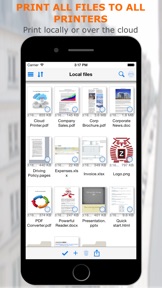
The Ultimate File Management, Transfer and Print solution for the iPhone. Print to ALL printers (Not just AirPrint Printers). View, store & print email, documents & PDFs, all major cloud servers, attachments, photos, contacts & web pages. Convert documents and images to PDF files. Also print from inside other app e.g. Safari, Photos & more
MDM Support - Support for Mobile Device Management multiple app configuration
- Chosen by Apple for "What's Hot" on the App Store
- Featured on the Discovery Channel
MacWorld: "PrintCentral is much more than a printing utility-it is a veritable office center"
AppCraver: "This app will let you print basically anything from basically anywhere."
► Print ALL content to ALL Printers
• Print direct to most existing WiFi or shared printers, or use our free printer/file sharing Mac/PC WePrint software for ALL printers.
• Print to all AirPrint, non-AirPrint & network shared printers
• Print via Google Cloud Print
• Print files & other content from other apps
• Print almost anything from your Mac to your iPhone as a PDF file
• Print Preview and print page selection
• Print remotely via 3G/4G
• Choose from a large range of printing options. Copies, Duplex, Grayscale, Image sizes, Page Range, Paper Size, Margins ...
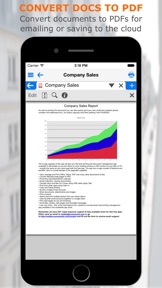
• Save web pages, documents etc. as PDF files
• Mobile printing using many Brother & Zebra mobile printers. e.g. Brother PJ-673, Zebra iMZ 220 ...
• Other USB & Bluetooth printers can be used with free print server software
► Complete File & Cloud Server Management/Transfer/Conversion
• The most advanced File Management app available for the iPhone
• Combine all of your Cloud Servers together to Transfer Files between them and other devices
• iCloud, Dropbox, Evernote, Box, FTP, Google Docs, OneDrive, ShareFile, SugarSync, Transporter, WebDAV & More
• Print, Send or fetch files from Other Apps to store centrally
• Secure with an App Password or Finger Touch ID
• Advanced search to find files on local and cloud servers
• Integration with the global device Spotlight Search
• Zip multiple files to send via email or save to a Cloud Server
► Apple Watch
• Print Images and Photos straight from your Apple Watch
• Print from all of your Cloud Servers
• Browse all of your photo albums without syncing beforehand
► WiFi Hard Drive
• Mount your iPhone as a network server on your Mac or PC for quick file transfer
• Send and fetch files from your iPhone to your Mac or PC or Network server
• Drag and drop documents & files between devices
► Transfer Files and Content to computers and other devices
• Send content from other apps to other devices
• Use the built in Bluetooth or WiFi transfer features to quickly and simply send files to another iPad, iPhone, Mac or PC
• Transfer files via WiFi if available, or instantly with Bluetooth
• Copy text or an image from a Web Page and send to another device with a single tap
• Send a phone number, address, photo or other content quickly to a friend
• Drag and drop to move files to other devices
► Emails - Print, Attach files, Save and PDF Convert
• Print emails and attachments
• Attach multiple files and images to new emails
• Supports virtually all email accounts
• Send Cloud and other files as attachments
• Save attachments for archiving or emailing
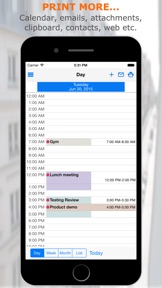
► Complete Calendar Printing
• View and Print by Day/Week/Month
• Choose which calendars to display and print
• Email your calendar views as PDFs
• Print event maps and directions
► Print and Save Web Pages
• Print from Safari
• Copy web and email content from apps to print or convert to PDF
• Save downloaded files from web pages for archiving or emailing
• Send web pages as PDF email attachments
► Photos and Image File Sharing and Transfer
• Move Image/Video Files to your Photo Album
• Move Photos & Image Files to and from your Cloud servers, Mac/PC or another iPad/iPhone
• Print Photos in multiple sizes
► Contacts
• Search & select multiple contacts to print
• View all emails for each contact
Hvad er nyt i denne version? (5.6.6)

• Convert PDF files to grayscale PDFs • Fixed advanced file search in clipboard screen • Better HEIC photo attachment compatibility • Fixed iPad mouse motion closing menus and dialogs • Browser setting to disable URL previews • Added divider lines to day/week screen printing • Print option to align hours vertically in week • Print option to only print week days • Resolved saving month view as a PDF showing processing delay • Added option to not print full height colour bars for "All Day" events • Fixed an issue with event hour alignment across days • Setting to not stretch all day event colour bands down the whole day • Fixed issue when editing a new text file • Major update of the reminder screen and reminder filter options • Better support for Duplex when using the Postscript printer driver • Fixed an issue with listing folders with some email accounts • New option to combine Reminders with Appointments. App Settings - Calendar section • Added a new email option to use your own email server settings inside CalPrint. Located in the App Settings - Email section • Setting to ask before opening a web link into an external app
Support our hard working team - support regular updates and new PrintCentral Pro features with a quick review on the App Store, thanks!

Info

Kategorier

Version

5.6.6

Størrelse

79,9 MB

Game Center

Nej

VPP Device Licensing

Ja

Vurdering

Alder: 4+

Kompatibilitet

iOS 9.0 eller senere

Enheder

iPhone 4S, iPhone 5, iPhone 5c, iPhone 5s, iPhone 6, iPhone 6 Plus, iPhone 6s, iPhone 6s Plus, iPhone SE, iPhone 7, iPhone 7 Plus, iPhone 8, iPhone 8 Plus, iPhone X, iPhone XR, iPhone XS, iPhone XS Max, iPhone 11, iPhone 11 Pro, iPhone 11 Pro Max, iPhone SE (2. generation), iPhone 12, iPhone 12 Pro, iPhone 12 Pro Max, iPhone 12 mini, iPad 2 (Wi-Fi), iPad 2 (3G), iPad (3. generation) (Wi-Fi), iPad (3. generation) (4G), iPad (4. generation) (Wi-Fi), iPad (4. generation) (4G), iPad (5. generation) Wi-Fi, iPad (5. generation) Wi-Fi + Cellular, iPad (6. generation) Wi-Fi, iPad (6. generation) Wi-Fi + Cellular, iPad Pro, iPad Pro (Cellular), iPad Pro (9,7"), iPad Pro (9,7") (Cellular), iPad Pro 12,9" (2. generation), iPad Pro 12,9" (2. generation) Wi-Fi + Cellular, iPad Pro (10,5"), iPad Pro (10,5") Wi-Fi + Cellular, iPad Pro (11"), iPad Pro (11") Wi-Fi + Cellular, iPad Pro 12,9" (3. generation), iPad Pro 12,9" (3. generation) Wi-Fi + Cellular, iPad Air, iPad Air (Cellular), iPad Air 2, iPad Air 2 (Cellular), iPad Air (3. generation), iPad Air (3. generation) Wi-Fi + Cellular, iPad mini (Wi-Fi), iPad mini (4G), iPad mini Retina, iPad mini Retina (Cellular), iPad mini 3, iPad mini 3 (Cellular), iPad mini 4, iPad mini 4 (Cellular), iPad mini (5. generation), iPad mini (5. generation) Wi-Fi + Cellular, iPad (7. generation) Wi-Fi + Cellular, iPad Pro 11" (2. generation), iPad Pro 11" (2. generation) Wi-Fi + Cellular, iPad Pro 12,9" (4. generation), iPad Pro 12,9" (4. generation) Wi-Fi + Cellular, iPad Air (4. generation) (Wi-Fi), iPad Air (4. generation) (Wi-Fi + Cellular), iPad (8. generation) Wi-Fi, iPad (8. generation) Wi-Fi + Cellular, iPad Pro 11" (3. generation), iPad Pro 11" (3. generation) Wi-Fi + Cellular, iPad Pro 12,9" (5. generation), iPad Pro 12,9" (5. generation) Wi-Fi + Cellular, iPod touch (5. generation), iPod touch (6. generation), iPod touch (7. generation), Apple Watch Series 4, Apple Watch Series 5, Apple Watch Series 6 (GPS), Apple Watch Series 6 (GPS + Cellular), Apple Watch Series SE (GPS), Apple Watch Series SE (GPS + Cellular)

Sprog

engelsk, fransk, italiensk, japansk, kinesisk, spansk, tysk

App Store: Vurderinger

Anmeldelser og vurderinger

4,5 af 5 (3 bedømmelser)

App Store: Anmeldelser

2016-04-15

Ekstrem kraftfuld.

Funktionerne minder meget om de man finder på en computer. Er især glad for at den automatisk finder printere delt på et netværk. Den har modtaget flere updates mens jeg har haft den, med UI forbedringer.
Razzerdenkage
Version 4.1.1
2012-09-13

Pro

Fedt
Steen Larsen
Version 2.3