Beskrivelse
ABBYY FineReader PDF Pro - the first smart AI-powered scanner that turns your mobile device into an all-purpose tool to quickly capture docs and books, create electronic copies in PDF and JPEG and extract texts from scans for further editing and sharing.
FineReader PDF Pro - the top mobile scanner for iPhone or iPad from ABBYY, a Digital Intelligence company.
*** Ranked #1 Business application in 98 countries ***
*** Winner of SUPERSTAR Award in the "Document Capture" category in the Mobile Star Awards ***
Use FineReader PDF to scan paper documents, books, agreements, receipts, magazine articles, notes, recipes, charts, tables, slides, whiteboards or even billboards on the street and get perfect digital copies.
KEY FEATURES
• PDF & JPEG. Scan any text and save scans to JPEG images or cross-platform PDF documents.
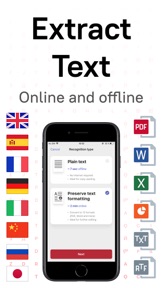
• OFFLINE OCR. Quickly extract text from scans into TXT format on your device without an internet connection.
• ONLINE OCR. Recognize text (OCR) on scans in 193 languages (including Latin, Cyrillic, Chinese, Japanese, Korean alphabets) and choose from among 12 output formats including Word, Excel, PDF, preserving the original document formatting.
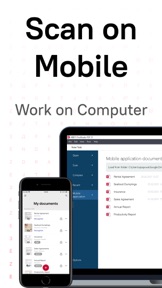
• SHARE & EXPORT. Send results by email, to FineReader PDF for Windows, save in cloud storages - iCloud Drive, Dropbox, Google Drive, Yandex.Disk, Evernote, OneDrive for Business and more.
• ABBYY NEURAL NETWORK. The smart gallery will automatically classify documents into 7 types: A4, books, business cards, handwritten, IDs, other docs, receipts.
• SEARCH TEXT ON PHOTOS. Type a text containing on a photo into a Search field in the gallery. FineReader PDF Pro will find photos that have this text.
• AR RULER. Define doc size in AR. It will be useful for non-standard documents and further printing them out in proper proportions.
• BOOKSCAN TECH. When scanning books, BookScan will split the opposing pages into two separate images and correct any distortions and lighting defects. It will unbend any curved lines as if you pressed the book against the glass of a conventional scanner (Internet required, up to 100 pages per document).
• SIRI SHORTCUTS. Open scans with Siri and set the flow of actions with scans using Shortcuts app.
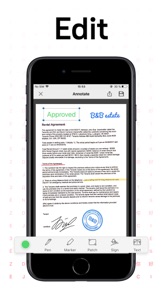
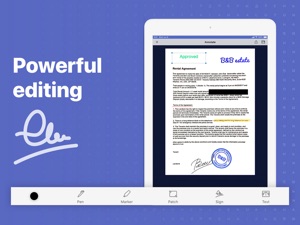
• ANNOTATE SCANS. Discover a set of easy-to-use tools to modify your PDFs: add your signature or a text box, use highlighter, write with a pen, or conceal content with the redaction tool.
• 3D TOUCH & SPOTLIGHT SEARCH SUPPORT.
• PASSWORD ON PDF. Add a password for the image-only PDF files while exporting and sending via email.
• MULTIPAGE DOCS. Create, edit, and enhance separate images or large multi-page documents without any additional selection on the viewfinder (up to 100 pages per document).
• AUTO-CAPTURE AND FILTERS. Excellent visual quality with auto-capture of page boundaries and advanced image filters, which processes scans in color, greyscale or black-and-white versions.
• BUILT-IN FILE STORAGE. Save scans inside the app with tags and search capabilities.
• Transfer docs to your Mac or PC using iTunes sharing.
• AIRPRINT. Print out scans directly from your iPhone or iPad.
CORPORATE VOLUME LICENSING
If you are interested in volume licensing (from 100 licenses) for your company or any customization of the app, please contact us at mobile@abbyy.com
Read us:
Mobileblog.abbyy.com/en
Twitter @abbyy_mobile_ww
Facebook.com/AbbyyMobile
Do you like FineReader PDF Pro? Please leave a review!
Hvad er nyt i denne version? (15.2)
+ Meet the bulk export. Choose all documents you need and share them at once. The long-awaited feature is finally here!
+ We added a Gallery button to My documents screen. Now you're one step closer to creating perfect scans of document photos.
+ Minor bugs fix and stability improvement.
The most important in previous releases:
+ Sort documents by date or in alphabetical order.
+ Create custom name template for new documents. To setup a template, go to Settings and tap Document name template.
+ The minimum supported iOS version is 13.
Find out more on our blog: abbyy.com/blog/mobile
Do you like this update, as well as we do? We will be glad to see your feedback on the App Store! If you need us, you can contact us at support.abbyy.com